Google Veo 3: The Future of Text-to-Video Creation
Imagine describing a scene with words—say, “a vintage car cruising down a coastal highway at sunset, reflections of the ocean dancing on its chrome finish”—and within seconds, you have a fully rendered video clip that looks like it was shot with a high-end cinema camera. No camera, no crew, no editing suite. Just text.
That’s exactly what Google Veo 3 brings to the table.
Veo 3 is Google DeepMind’s latest leap in text-to-video AI technology, capable of generating cinematic-level visuals with physics-aware motion, realistic lighting, and even sound. While tools like Runway, Pika, and Sora have been pushing the text-to-video frontier, Veo 3 stands out for one key reason—its near-film realism. It doesn’t just generate images in motion; it understands the physical world behind them.
For creators, marketers, and social media managers, this is game-changing. Whether you’re making a product video, a film teaser, or an ad concept, Veo 3 could replace weeks of production work with a few lines of text and a bit of imagination.
What Exactly Is Google Veo 3?
Veo 3 is a text-to-video AI model developed by Google DeepMind that takes written descriptions and turns them into short, realistic video clips. It’s part of Google’s broader push toward generative media technology—tools that can create art, music, speech, and video purely from prompts.
Here’s the quick breakdown:
| Feature | Description |
| Type | Text-to-video generator |
| Developer | Google DeepMind |
| Core Strength | Advanced realism with physics-aware motion |
| Best For | Film-style realism, product ads, cinematic effects |
| Price | Invite-only for now, expected to move to a paid tier |
| Output Quality | 1080p realistic videos up to several seconds long |
| Audio | Automatically generated ambient sounds and speech |
| Access | Early access through select creators and enterprises |
Veo 3 uses advanced deep learning models that understand motion, lighting, perspective, and physical consistency—things most AI generators still struggle with. It doesn’t just create frames independently; it simulates how objects interact with the world.
What Makes It Unique
- Physics-Aware Motion: Veo 3 understands gravity, balance, and inertia. For instance, if you prompt “a dancer twirling under stage lights,” the AI will ensure her skirt flares realistically and her steps follow natural rhythm and weight distribution.
- Cinematic Camera Movement: It can simulate panning, zooming, dolly-ins, and aerial tracking shots. This makes the video feel more like an actual film shoot.
- Lighting and Shadows: Veo 3 calculates dynamic lighting and reflections that adjust with camera movement—an upgrade from static or mismatched shadows in older AI models.
- Audio Generation: Unlike text-to-video tools that require separate sound editing, Veo 3 includes matching ambient sound or dialogue synced to visual action.
- Creative Control: You can specify details like “handheld camera shake,” “golden hour lighting,” or “slow-motion capture,” and the AI interprets them visually.
How It Works — From Text to Moving Reality
Creating a video in Veo 3 feels like typing a scene description into a screenplay—except the AI produces the visuals for you. Let’s break it down.
Step 1: The Prompt
You start with a detailed text prompt.
For example:
“A white sports car drifts through a neon-lit tunnel at night. Sparks fly from its tires. Camera follows from behind in a cinematic slow-motion shot.”
This short description gives the AI context for color, lighting, motion, and emotion.
Step 2: AI Interpretation
Veo 3 uses a combination of large language models (to understand intent and context) and diffusion-based video models (to generate realistic motion and texture). The model predicts not only what each frame looks like—but also how each frame should move based on physics.
Step 3: Frame Generation
The AI generates hundreds of frames per second, simulating lighting, perspective, and environmental interaction. Shadows move, water ripples, hair reacts to wind—all generated mathematically.
Step 4: Audio Synchronization
If your prompt includes audio cues (“waves crashing,” “crowd cheering”), Veo 3 synchronizes sound with motion, creating an immersive video experience.
Step 5: Review and Refinement
You can regenerate or tweak parts of the prompt until the results match your vision. This is where Veo’s “Fast” mode helps—offering lower-cost, quicker iterations.
Veo 3 vs. Other Text-to-Video Tools
To understand Veo 3’s position in the current landscape, here’s a comparison with other top tools.
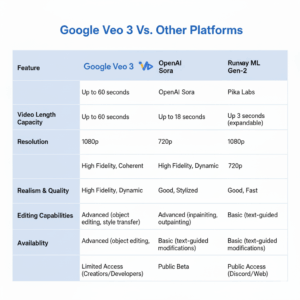
| Feature | Google Veo 3 | OpenAI Sora | Runway Gen-3 | Pika Labs |
| Realism | Film-quality lighting and physics | Cinematic but experimental | Stylized realism | Cartoonish to realistic |
| Audio | Built-in native audio | Planned feature | External sync | None |
| Motion Physics | Physics-aware | Moderate realism | Moderate realism | Basic |
| Duration | Up to several seconds (expandable) | 60 seconds | 15 seconds | 10 seconds |
| Ease of Use | Text and visual prompts | Text-only | Text or video input | Text-only |
| Availability | Invite-only | Developer beta | Public | Public |
Use Cases That Matter
Veo 3 isn’t just an AI curiosity—it’s a tool that could reshape entire industries. Let’s explore its key applications.
Film Pre-Visualization: Directors can test scenes before shooting. Instead of costly location scouting or CGI pre-renders, Veo 3 can visualize storyboards in minutes.
Advertising and Product Videos: Marketers can create short, cinematic product showcases without renting studios or hiring videographers.
Imagine typing:
“A smartwatch floating in a dark room with pulsing neon rings around it, reflecting off its glass surface.”
And instantly getting a 10-second ad clip ready for TikTok or Instagram.
Education and Training: Educational institutions can produce realistic simulations—like lab experiments or historical reenactments—without physical materials.
Gaming and Animation: Game studios can prototype environments and cutscenes using Veo 3 before moving to full 3D modeling.
Social Media Content: For influencers or brands, it’s an instant content engine—short, realistic clips that drive engagement.
Creative Workflow Example
Let’s say you’re a social media manager for a tech brand launching a new laptop. Here’s how Veo 3 could fit your workflow:
| Step | Task | Description |
| 1 | Ideation | Write a 2-sentence prompt describing the product concept. |
| 2 | Generation | Use Veo 3 to generate 3 video options (different angles or lighting). |
| 3 | Review | Choose the most visually appealing version. |
| 4 | Edit | Add logo overlay and brand tagline in your video editor. |
| 5 | Post | Upload to social channels and test engagement metrics. |
Result: You created a cinematic ad in a single day—something that used to take a week.
Strengths and Limitations
| Category | Strength | Limitation |
| Realism | Unmatched lighting and motion accuracy | Sometimes uncanny character faces |
| Audio | Auto-synced ambient sounds | Limited control over soundtrack |
| Speed | Fast generation in “Veo Fast” mode | High-quality mode may take longer |
| Accessibility | User-friendly prompt system | Invite-only at the moment |
| Cost | Cheaper than full film production | Likely subscription-based soon |
Prompting Tips for Best Results
Getting good results from Veo 3 depends heavily on how you write your prompts. Here are some tested guidelines:
- Be specific, not vague.
Instead of “a person walking,” write “a young woman walking along a foggy mountain trail at dawn.” - Include camera instructions.
Example: “Close-up shot,” “aerial drone view,” “slow-motion pan.” - Describe lighting and atmosphere.
“Golden hour sunlight” or “blue neon reflections” change the mood entirely. - Mention sound cues.
Add “ambient city sounds” or “soft piano playing in the background.” - Limit complexity per prompt.
Veo 3 handles scenes better when they focus on one or two main actions.
Future of AI Video — Where Veo 3 Leads Us
Veo 3 is part of a broader trend where AI and creativity are merging into one. The next stage will likely include:
- Longer video durations (up to minutes instead of seconds)
- Interactive editing (adjusting camera angles after generation)
- Voice-driven prompting (describe the scene aloud)
- Multimodal integration (combine text, images, and sounds for generation)
The implications are massive.
Filmmakers could use it for concept trailers.
Businesses could personalize ads for different audiences at scale.
Educators could build immersive lessons without large budgets.
But it also raises questions—about authenticity, copyright, and human creativity. The more lifelike these videos become, the harder it will be to distinguish between AI-generated and real footage.
Opportunities for Content Creators and Businesses
For Marketers
You can rapidly test multiple ad variations, saving money on production while increasing creative output.
For Small Businesses
It levels the playing field—you can produce premium-quality visuals without hiring an agency.
For Social Media Managers
Veo 3 allows instant content creation for trends. You can make videos that match trending sounds or aesthetics without external editing.
For Filmmakers
Storyboard or pitch scenes visually before committing resources to filming.
The Human Element Still Matters
Even though Veo 3 handles visuals beautifully, human creativity remains essential. The best results come from storytelling, not just description. You still need to convey emotion, intent, and message.
Think of Veo 3 as a creative amplifier—a powerful assistant that executes your ideas faster, but it still depends on your direction.
Conclusion: A New Era of Video Creation
Veo 3 isn’t just another AI generator—it’s a milestone in how we create and consume video. With its realistic motion, cinematic quality, and built-in sound, it sets a new standard for what’s possible in digital storytelling.
While it’s currently invite-only, its potential is too vast to remain limited for long. Soon, creators everywhere—from filmmakers to marketers—will have access to this level of generative power.
And when that happens, the question won’t be “Can I make a professional video?”
It’ll be “How creative can I be with the time I just saved?”
Leave a Reply