
nikko v
Hailuo MiniMax: The Text-to-Video Tool Changing How Creators Tell Stories
Have you ever stared at a blank screen, trying to visualize the perfect video for a social post or marketing campaign? You can picture the idea clearly in your mind — the tone, the colors, the movement — but the tools, time, and skills needed to bring it to life can feel out of reach. That’s where Hailuo MiniMax comes in.
Hailuo MiniMax isn’t just another text-to-video generator; it’s a new kind of creative assistant built for today’s fast-paced digital world. Whether you’re a marketing professional crafting ad visuals, a social media manager chasing trends, or a storyteller who wants to turn words into motion, this tool brings ideas to life through automation and smart design.
What makes it fascinating is how effortlessly it bridges the gap between imagination and production. You don’t need a studio setup, video editing experience, or even an expensive subscription — just an idea and a few lines of text. Hailuo MiniMax takes care of the rest.
But how exactly does it work? And what makes it stand out among the growing number of AI video tools today? Let’s dive deep into what makes Hailuo MiniMax one of the most promising creative tools available.
What Is Hailuo MiniMax?
At its core, Hailuo MiniMax is a text-to-video generator — an AI tool that converts written prompts into short, animated video clips. Unlike traditional editors that require manual timelines, layers, and audio adjustments, MiniMax interprets your text and automatically builds a scene around it.
Imagine typing:
“A golden sunrise over a futuristic city, drones flying between skyscrapers, people walking below in neon light.”
In seconds, MiniMax generates a video that matches that scene — dynamic, stylized, and complete with motion. It’s like writing a story and watching it unfold visually, without the technical burden of editing or design.
This accessibility is what makes it particularly appealing to marketers, social media creators, and storytellers who want to experiment with visuals quickly. Instead of spending hours with editing software, users can create multiple video drafts in minutes.
The Technology Behind Hailuo MiniMax
While Hailuo MiniMax is simple to use, the technology under the hood is impressively advanced. It uses a multi-modal AI engine — a system that understands both language and visual context.
This means when you type a sentence, the AI doesn’t just look for keywords like “sunrise” or “city.” It analyzes tone, mood, and action cues. For instance, the difference between “a quiet sunrise” and “an explosive sunrise” leads to totally different motion styles, lighting, and pacing in the final video.
Here’s a breakdown of what powers it:
| Feature | Description |
| Language-to-Visual Mapping | Translates written descriptions into visual compositions using AI models trained on video datasets. |
| Scene Composition Engine | Automatically decides camera angles, transitions, and scene cuts. |
| Emotion and Tone Recognition | Adapts color palette and motion speed to match emotional cues in the text. |
| Adaptive Rendering | Balances video quality with rendering speed for faster output. |
| Audio Syncing | Generates background sounds or music that match the mood of the video. |
This blend of linguistic and visual AI makes MiniMax unique. It’s not just “making a video”; it’s interpreting your story through creative logic.
Why Hailuo MiniMax Is Perfect for Marketing Creatives
Marketers often struggle to keep up with the constant need for new content. Campaigns move fast, trends shift even faster, and audiences expect fresh visuals daily. MiniMax fits seamlessly into this environment.
Here’s why:
- Speed & Efficiency: Instead of briefing a team, waiting for drafts, and revising, you can create multiple versions of a concept instantly.
- Consistency in Branding: You can describe your brand tone (“modern,” “playful,” “bold,” etc.), and MiniMax adjusts the visuals to match.
- Experimentation Without Risk: You can try out new ideas — product teasers, animated taglines, or story-driven ads — without heavy costs.
- Accessibility for Small Teams: Solo creators and startups can now produce professional-quality videos that once required big budgets.
Imagine a small clothing brand launching a new eco-friendly line. In MiniMax, typing something like:
“A model walking through a forest as sunlight filters through leaves, text overlay: Sustainable Fashion for a Greener Future.”
The tool can create that concept-ready video in seconds. It’s not just efficient — it’s empowering for creators who want to make visual storytelling part of their brand voice.
How to Use Hailuo MiniMax: Step-by-Step Guide
One of MiniMax’s biggest strengths is its simplicity. You don’t need to be a tech expert or a video producer to use it. Here’s a quick walkthrough of how it works:
- Start with Your Idea: Think of what you want to visualize. It could be a scene, an emotion, a story snippet, or a product shot.
- Type Your Prompt: Use clear, descriptive language. For example:
“A young woman drinking coffee by the window as rain falls outside. Gentle piano music.”
- Adjust Settings (Optional): You can tweak video length, aspect ratio, or visual style (cinematic, animated, realistic, etc.).
- Generate the Video: Hit “Create,” and the AI processes your text, composes visuals, and renders the video.
- Refine and Download: You can modify prompts or adjust timing until you’re happy with the final result.
This workflow is why many creators describe MiniMax as “text to magic.” It feels like working with an assistant who instantly understands your vision.
Comparing Hailuo MiniMax to Other Text-to-Video Tools
AI-generated video tools are becoming a competitive field, with big names like Runway, Pika, and Synthesia leading the space. However, MiniMax offers a different balance of simplicity, affordability, and creative control.
Here’s a comparison snapshot:
| Tool | Primary Focus | Ease of Use | Output Quality | Pricing Model |
| Hailuo MiniMax | Creative storytelling, marketing visuals | Very Easy | High | Free + Credits |
| Runway ML | Professional video editing with AI | Moderate | Very High | Subscription |
| Pika Labs | Short social videos, creative edits | Easy | High | Freemium |
| Synthesia | Avatar-based corporate videos | Easy | Medium | Subscription |
| Kaiber | Artistic and music-inspired videos | Moderate | High | Credits |
What stands out about MiniMax is that it doesn’t confine users to specific video formats or use cases. While others focus on avatars or scene editing, MiniMax gives you freedom to visualize any idea, whether it’s a brand teaser, a poetic clip, or a visual essay.
The Creative Side: Turning Words into Visual Stories
Beyond marketing, MiniMax is finding its place in creative storytelling. Writers, poets, and indie filmmakers are using it to bring abstract ideas to life. Imagine writing a line of poetry and instantly seeing it play out as a moving image — that’s where MiniMax shines.
It helps creatives visualize emotions, environments, and moods. For example:
“Loneliness feels like a person walking in an empty subway, the lights flickering above.”
MiniMax can translate that sentence into a moody, atmospheric clip that feels cinematic. This kind of creative fusion between words and visuals makes it more than a tool — it’s becoming a new form of expression.
Pros and Cons of Hailuo MiniMax
Every tool has its strengths and trade-offs. Here’s an honest look at what works best and where there’s room to grow:
| Pros | Cons |
| Easy to use — no editing experience needed | Limited customization in advanced scene control |
| Free to start, affordable credits system | Requires clear, descriptive prompts for accuracy |
| Fast rendering times | Output length limited (best for short clips) |
| Great for creative and marketing visuals | Still improving on realism and human animation |
| Works across multiple styles (cinematic, animated, artistic) | May not suit long-form storytelling yet |
The good news? Hailuo is constantly updating its AI engine, so features like extended clips, voiceovers, and advanced motion editing are on the horizon.
The Future of AI Video Creation
AI video tools like MiniMax are changing how content is made. In the past, creating video required heavy production — cameras, lighting, actors, and editing suites. Now, creators can skip all that and still tell meaningful stories.
What’s emerging is a new kind of creative economy — one where ideas matter more than equipment. As AI tools get smarter, they’ll help people from all backgrounds express themselves visually.
MiniMax stands at the front of that movement, offering a glimpse into a future where storytelling is instant, inclusive, and visually stunning.
Use Cases: Where MiniMax Shines the Most
Hailuo MiniMax can be used across multiple industries and creative scenarios. Here’s a breakdown of its most effective applications:
| Use Case | Example Scenario | Why It Works |
| Social Media Content | Quick storytelling clips or brand teasers | Fast creation, trend adaptability |
| Marketing Campaigns | Product showcases or motion ads | Visual appeal, consistent branding |
| Education | Concept explanations or visual learning snippets | Engaging visuals, simplified learning |
| Entertainment | Short story or lyric videos | Expressive and artistic results |
| Personal Projects | Visual diaries or conceptual poetry | Freedom of creative exploration |
This versatility makes it not just a business tool, but also a creative outlet — a way to visualize what words alone can’t fully express.
Practical Tips for Getting the Best Results
If you’re new to text-to-video tools, a few tips can help you maximize MiniMax’s potential:
- Be Descriptive but Concise: Too many adjectives can confuse the AI; focus on the essence of your vision.
- Mention Mood and Motion: Add emotional and movement cues (“slow pan,” “soft lighting,” “energetic rhythm”).
- Experiment with Styles: Try different genres — cinematic, fantasy, minimalist, etc.
- Use Text Overlays Smartly: Combine video with bold text for social media posts.
- Iterate Quickly: Generate multiple drafts, compare, and refine — that’s the real creative power of AI.
These small habits make a big difference in the outcome, helping you craft videos that feel intentional and expressive.
The Real Creative Edge: Freedom to Imagine
What truly sets Hailuo MiniMax apart is that it gives creators freedom — freedom to imagine without limits, to create without tools, and to express without technical barriers.
It’s a step toward democratizing creativity. Just like smartphones made everyone a photographer, tools like MiniMax are making everyone a video storyteller.
Whether you’re running a brand, writing poetry, or just experimenting with visuals for fun, MiniMax is like having a visual partner who understands your creative pulse.
Conclusion: The MiniMax Moment
Hailuo MiniMax proves that the future of creativity is not about replacing humans — it’s about empowering them. It turns imagination into something you can see, share, and feel.
In a world that thrives on visuals, attention, and storytelling, MiniMax gives creators the tools to stand out. It’s quick, intuitive, and most importantly — inspiring.
So whether you’re building the next viral campaign, visualizing your story idea, or simply exploring what’s possible, Hailuo MiniMax is your new creative ally — the bridge between words and motion.
Because sometimes, all you need to start is a single line of text… and the courage to imagine what it could become.
Kling AI: The Future of Text-to-Video Creation with Cinematic Precision
Artificial intelligence has taken creativity to a level we couldn’t have imagined just a few years ago. From generating photorealistic images to composing entire music tracks, AI is rewriting what’s possible in digital artistry. And now, we’re witnessing one of its most exciting frontiers — AI-generated video. At the forefront of this revolution is Kling AI, a text-to-video model developed by Kuaishou, the Chinese tech giant known for its video-sharing platform.
Kling AI has captured global attention for one major reason — its shockingly smooth, realistic video output. It doesn’t just generate short clips; it creates sequences with natural motion, emotional depth, and cinematic quality that feel almost human-directed.
In this article, we’ll dive deep into Kling AI’s technology, explore how it’s reshaping creative industries, and discuss its pros, limitations, and future possibilities. Whether you’re a filmmaker, marketer, or just fascinated by AI’s creative evolution, Kling AI is worth your attention.
Understanding Kling AI: The Power Behind the Motion
Kling AI is a text-to-video generation system that converts written prompts into fully animated clips — think of typing “a woman walking through a neon-lit street in the rain” and watching it unfold in seconds.
While that might sound similar to what tools like Runway Gen-3 or Pika Labs can do, Kling AI stands apart because of its realism and motion consistency. Characters move fluidly, camera angles shift naturally, and even tiny details like hair movement or reflections respond as if a real cinematographer were behind the lens.
So, how does Kling AI achieve this? Let’s unpack the tech side in plain language.
The Model Foundation
Kling AI is built on advanced diffusion models, a form of machine learning that starts with visual “noise” and gradually shapes it into clear frames based on the input text. Unlike traditional frame-by-frame synthesis, Kling AI uses spatiotemporal consistency modeling, meaning it keeps track of how objects and people move between frames. This results in realistic motion continuity, where actions look purposeful rather than robotic.
Training and Data Complexity
Kuaishou has access to one of the world’s largest short-video datasets — billions of real-life clips uploaded to its platform. This provides Kling AI with a diverse library of human movement, environmental lighting, and cinematic compositions to learn from. Essentially, Kling AI understands not just what things look like, but how they behave in different scenarios.
Visual Fidelity
One of Kling AI’s biggest strengths is temporal resolution. Many AI video tools can create sharp single frames but struggle to maintain that quality during movement. Kling AI manages to keep visual clarity intact, with consistent colors, lighting, and shadows — a rare feat for AI video generators.
Kling AI vs. Other Text-to-Video Tools
While Kling AI is still in its free beta stage, it’s already being compared with global leaders in the same space. Let’s look at how it stacks up against major players:
| Feature | Kling AI (Kuaishou) | Runway Gen-3 | Pika Labs | Sora (OpenAI) (Preview) |
| Origin | China (Kuaishou) | U.S. | U.S. | U.S. |
| Output Quality | Ultra-realistic, cinematic | High, stylized realism | Smooth but slightly cartoonish | Hyper-realistic |
| Motion Consistency | Exceptional | Strong | Moderate | Strong |
| Length Capability | Up to several seconds (Beta) | 4–16 seconds | 3–10 seconds | Up to 1 minute (demo) |
| Style Range | Realistic + anime styles | Cinematic + realistic | Creative + animation | Realistic |
| Accessibility | Free beta (invite-based) | Subscription | Free + paid | Not public yet |
| Strength | Smooth character motion | Story control | Fast generation | Real-world realism |
| Weakness | Limited user control (beta) | Pricey for long clips | Less realism | Not public |
This table reveals something interesting: Kling AI competes with tools from tech powerhouses despite still being in its early stages. Its dual ability to handle cinematic realism and anime-style visuals makes it uniquely versatile for both filmmakers and digital artists.
Cinematic Realism Meets Creative Freedom
One of Kling AI’s most talked-about achievements is its ability to simulate camera movement and storytelling depth. Instead of static or robotic frames, it captures the visual language of cinema — panning shots, lighting transitions, and natural character motion.
This gives creators an unprecedented level of creative freedom. Imagine crafting an entire film scene without hiring actors, renting gear, or scouting locations — just by writing detailed prompts.
Let’s look at some creative examples that highlight Kling AI’s range:
- Film Production: Generate pre-visualizations for scenes before shooting.
- Advertising: Create quick mockups or concept videos for pitches.
- Education: Simulate historical or scientific events visually.
- Content Creation: Produce short stories, vlogs, or music videos with AI actors.
- Animation and Anime: Bring illustrated characters to life in motion sequences.
The realism is what sets it apart. When characters move, their limbs and expressions align naturally with gravity and perspective. Lighting reflects off objects the way it would in an actual film set. Even environmental elements — smoke, wind, or rain — appear synchronized with the action.
Inside Kling AI’s Artistic Brain
While the underlying algorithms are complex, Kling AI’s visual intelligence can be understood in simpler terms. It’s not just “copying” motion; it’s learning cinematic logic.
Here’s what that means:
Scene Understanding
Kling AI doesn’t merely draw what the prompt says — it interprets context. For instance, if you type “a man runs across a beach at sunset”, Kling AI considers the time of day, lighting temperature, and physics of running. This makes the output feel cohesive, not just stitched together.
Emotional Cues
Unlike older models that treated faces as static masks, Kling AI incorporates emotion mapping. Smiles, frowns, or subtle eye movements appear synchronized with the body’s motion, adding layers of believability.
Cinematic Depth
Depth of field, motion blur, and camera focus shifts are all present. This gives the videos a film-like texture that rivals professional cinematography.
In short, Kling AI doesn’t just generate video — it directs it.
The Rise of AI Cinematography
Kling AI symbolizes a broader shift toward AI-assisted filmmaking. In traditional production, every scene demands time, crew, and cost. With text-to-video tools, creators can focus on concept and storytelling rather than logistics.
Filmmakers can now pre-visualize complex shots before stepping on set. Advertising agencies can produce conceptual mockups overnight. Even indie creators with no technical background can express cinematic ideas effortlessly.
This doesn’t mean AI will replace human directors. Rather, it acts as a collaborative assistant, providing drafts and inspiration that streamline the creative process. The future may not be about choosing between human or machine creativity — but about merging the two.
The Creative Impact: Empowering Storytellers Worldwide
For storytellers, Kling AI opens doors that were once locked behind budget and skill barriers. Let’s explore a few ways it’s changing creative workflows:
Democratizing Film Creation
Independent creators, small studios, and educators can now generate studio-quality visuals without huge investments. A single person with a vision can now make what once required a production team.
Rapid Concept Development
Writers and directors can visualize scripts faster. Instead of explaining a scene to others, they can show it instantly, turning abstract ideas into visible experiences.
Artistic Experimentation
Artists can experiment with tone, lighting, or setting variations. Want to see how a story feels in noir versus cyberpunk style? Kling AI makes that experimentation frictionless.
Anime and Visual Novel Development
Anime creators, particularly in Asia, are exploring Kling AI’s anime-style rendering capabilities. It brings the fluidity of animation to life with detailed, expressive motion, bridging the gap between drawn and dynamic storytelling.
Challenges and Limitations
Even though Kling AI feels revolutionary, it’s not without limits. Like all AI models, it’s still learning — and sometimes, that learning shows.
Limited User Control
Currently, prompts dictate most of the output. There’s no fine-grained control over character expressions, camera paths, or scene length. While impressive, it still functions as a “black box” — powerful but not fully customizable.
Clip Duration
Most generated videos are short (a few seconds long). That’s fine for previews, but not yet suitable for full storytelling. Longer videos often lose consistency in quality.
Occasional Motion Artifacts
Even with its smooth motion, small artifacts or distortions can appear, especially with complex movements or crowd scenes.
Ethical and Legal Questions
As with all AI-generated content, there are unresolved concerns about data sources, copyright implications, and deepfake misuse. Developers will need to address these as the tool matures.
Pros and Cons Summary
| Aspect | Pros | Cons |
| Video Quality | Highly realistic, consistent detail | Slight artifacts in complex scenes |
| Motion Dynamics | Smooth, lifelike movement | Limited camera control |
| Artistic Range | Realism and anime-style flexibility | Style blending not always perfect |
| Ease of Use | Simple text prompts | Minimal customization |
| Accessibility | Free beta access | Invite-only, limited availability |
| Innovation Level | Ahead of most competitors | Still in early development |
A Glimpse Into the Future: Where Kling AI Could Go Next
Kling AI’s beta success hints at something bigger — the dawn of AI film production pipelines. Imagine pairing it with AI voice generation, sound design, and editing tools. Entire films could be storyboarded, voiced, and animated within hours.
Interactive Storytelling
Soon, AI video generators like Kling could merge with gaming engines or VR platforms, allowing users to direct stories in real time.
Personalized Content
Marketers could create personalized video ads for individual viewers, adapting visuals based on interests or demographics.
Collaborative Platforms
We might see hybrid platforms where human creators can edit AI output — adjusting lighting, emotion, or pacing — blending intuition with automation.
Long-Form Narratives
As model capabilities expand, we’ll likely see full short films or series episodes generated entirely through text-based direction. This could redefine indie filmmaking and visual content production forever.
The Cultural and Global Significance
It’s no coincidence that Kling AI emerged from China. The country’s creative tech ecosystem has been accelerating rapidly, with companies like Kuaishou, Tencent, and Baidu pushing AI boundaries.
Kling AI represents not just a product, but a new era of global AI competition. It shows that innovation in generative media isn’t limited to Silicon Valley — it’s now a shared stage where creators from all over the world contribute to defining the next art form.
This cross-cultural evolution is healthy. It diversifies aesthetics, storytelling traditions, and artistic interpretations of what “realism” means in digital creation. From Chinese anime-inspired scenes to Western cinematic realism, Kling AI bridges these worlds.
Storytelling in the Age of AI
Let’s step back and think about what this means for storytelling itself.
For centuries, stories have been told through tools — from paintbrushes to cameras, and now, algorithms. Kling AI is simply another tool, but one that collapses the gap between imagination and execution. Writers can now see their words, not just describe them.
But that also raises philosophical questions:
If AI can visualize stories better than we can, what becomes of our creative identity?
The answer might lie in collaboration rather than competition. AI can generate, but it cannot feel — and that emotional core still belongs to us.
Human creativity gives stories purpose; AI gives them form.
Industry Outlook: From Novelty to Necessity
Just as photo editing once required specialists but became mainstream through tools like Photoshop, AI video generation may soon become standard in content creation.
Marketing teams, educators, and filmmakers could integrate Kling AI or similar tools as part of their regular workflow. Imagine using AI to visualize a pitch deck, illustrate a textbook concept, or animate a product tutorial in minutes.
Businesses that embrace such tools early will have a competitive edge in storytelling speed and visual innovation.
Tips for Using Kling AI Effectively
If you gain access to Kling AI’s beta, here are some practical tips to maximize your results:
- Be Descriptive but Focused: Use vivid language that paints a clear picture but avoids unnecessary complexity. Example: “A cinematic shot of a samurai walking through a snowy forest” works better than “A man in a scene with trees and snow.”
- Experiment with Styles: Try mixing realism and anime to see how Kling AI interprets different aesthetics. It often surprises users with unique visual blends.
- Think Like a Director: Write prompts as if you’re giving instructions to a film crew — include camera angles, lighting mood, or motion type.
- Iterate Often: The best results come from trial and error. Adjust your wording slightly to refine motion, atmosphere, and framing.
- Use It for Concept Visualization: Don’t expect full movie-length output yet. Instead, use it to develop visual mood boards, teasers, or short conceptual scenes.
What Sets Kling AI Apart Emotionally
There’s something subtly emotional about Kling AI’s videos — a sense that it captures human rhythm. Whether it’s the pacing of footsteps, the flutter of fabric, or the glow of sunset light, its attention to cinematic feeling makes it resonate more than most AI visuals.
While technology drives it, the output feels artistic rather than mechanical. That’s why so many creators describe it not just as a tool, but as a co-creator. It gives life to imagination in ways that feel almost intuitive.
Conclusion: The Beginning of a Visual Renaissance
Kling AI is more than just a text-to-video generator — it’s a preview of filmmaking’s future. Combining technical brilliance, artistic flexibility, and accessible creativity, it’s redefining what it means to visualize ideas.
From a technological standpoint, it represents a major leap in motion coherence, visual realism, and style diversity. From a creative perspective, it empowers anyone — regardless of skill or budget — to tell stories that once required full production teams.
Of course, challenges remain: ethical questions, creative boundaries, and the need for better control. But that’s part of evolution. Every new medium begins with limitations before it transforms into an art form.
As Kling AI continues to grow beyond beta, one thing is certain — it’s not just generating video. It’s reshaping imagination itself. And for the world of creators, that’s a cinematic revolution worth watching.
OpenAI Sora: The Future of Ultra-Realistic Video Creation
For years, people have dreamed of describing a scene and watching it come to life on screen — no cameras, no actors, no crew. Just imagination and words. That dream is now closer than ever, thanks to OpenAI’s Sora, a new AI model that turns simple text into ultra-realistic videos.
Think of it as storytelling without limits: you type “a golden retriever surfing under a sunset,” and Sora renders it into a video that looks like it was filmed on a beach in California. You describe “a classroom in 2040 where robots teach humans,” and the AI makes it cinematic, detailed, and astonishingly real.
We’re stepping into a new era where content creation might not need cameras at all. And that’s both exciting and a little terrifying. But to understand what makes OpenAI Sora such a big deal, let’s explore what it is, how it works, and why it could reshape storytelling, filmmaking, and education as we know it.
What Is OpenAI Sora?
At its core, Sora is OpenAI’s upcoming text-to-video model — a system that can generate highly realistic videos directly from written prompts. The name “Sora,” meaning sky in Japanese, perfectly captures its vision: limitless creativity and wide-open potential.
Unlike traditional video generation tools that piece together short, low-resolution clips, Sora aims for cinematic realism. It doesn’t just animate still frames; it understands motion, perspective, physics, and even emotional tone. Early demo videos reportedly show lifelike movements, natural lighting, and realistic environments that mimic the feel of real cinematography.
In short, Sora isn’t about cartoonish animations — it’s about believability.
And what’s revolutionary here is how OpenAI bridges the gap between language and video. Sora can interpret context from text prompts the same way ChatGPT understands and expands ideas. But instead of replying in words, Sora paints entire scenes that move, breathe, and react.
Imagine describing a scene like:
“A rainy night in Tokyo, neon lights reflecting off the wet streets, a lone figure walking with an umbrella.”
Within moments, Sora could create that sequence — complete with atmosphere, reflections, and emotional tone — all based on your description.
How Sora Works: From Words to Moving Reality
OpenAI hasn’t released all the technical details yet, but based on its existing AI models and research papers, Sora likely builds upon a diffusion model — similar to how DALL·E generates images but scaled up for motion and time.
Here’s a simplified breakdown of how it might work:
- Text Understanding: Sora first interprets the text prompt using natural language processing, identifying objects, actions, settings, and emotions.
- Scene Composition: The model predicts how those elements should appear in space — what’s foreground, background, and what should move.
- Temporal Diffusion: Instead of generating one image, it produces frames over time, ensuring smooth motion and consistent details across seconds or minutes.
- Physics & Realism: Sora integrates physical laws — gravity, lighting, and texture — to make everything look natural. This is what separates it from earlier video AIs that often looked glitchy or artificial.
- Refinement: Each frame is iteratively refined until the output reaches cinematic quality.
The result? Ultra-realistic, coherent video sequences that could pass as real footage to an untrained eye.
Why Sora Matters
OpenAI Sora isn’t just a fun toy for creative minds — it could redefine entire industries.
Storytelling and Filmmaking
Filmmakers can pre-visualize scenes before production or even create full films without physical sets. Indie creators with small budgets might soon produce Hollywood-level visuals with just a few sentences.
Education and Training
Educators could transform lessons into interactive videos. Imagine typing a science concept like “the water cycle explained through a forest ecosystem,” and Sora creates a full educational short — narrated and animated in seconds.
Marketing and Advertising
Brands can test campaign ideas visually before spending on production. Marketers could produce dozens of ad concepts overnight, letting data decide which resonates best.
Game Design and Simulation
Developers could use Sora to generate concept trailers or even scenes for story-based games. Combined with AI voice and text tools, this could fast-track creative prototyping.
Accessibility and Empowerment
Sora opens doors for those without access to film equipment or technical skills. Anyone with a story or idea — regardless of resources — can now visualize it.
Feature Comparison: Sora vs. Other AI Video Tools
| Feature | OpenAI Sora | Runway Gen-2 | Pika Labs | Synthesia |
| Type | Text → Ultra-realistic video | Text → Stylized video | Text/Image → Short video | Text → Talking avatar video |
| Realism | Ultra-realistic (cinematic) | Moderate (stylized look) | Good motion, less detail | Limited (face animation) |
| Use Case | Narrative content, trailers, explainers | Creative clips, social media | Animation, quick edits | Corporate training, AI presenters |
| Video Length | Longer, continuous scenes (expected) | Short clips (up to ~16 sec) | Short to medium | Fixed length (1–5 min) |
| Physics/Lighting | Naturalistic and dynamic | Synthetic or stylized | Decent but limited | Basic motion only |
| Ease of Use | Simple text prompts | Simple prompts, more setup | Requires visual input | Template-based |
| Release Status | Coming soon to ChatGPT | Public | Public | Public |
| Price | Not public (expected premium) | Subscription | Subscription | Subscription |
As you can see, Sora isn’t competing on quantity — it’s competing on quality. Where most AI video tools generate short, stylized clips, Sora aims to create longer, seamless, realistic footage that feels cinematic. It’s the difference between a TikTok clip and a short film.
How Sora Could Change Creative Industries
The Rise of the “Prompt Filmmaker”
Just as AI art birthed the role of “prompt artists,” Sora could create a new generation of prompt filmmakers — creators who master the art of describing scenes vividly enough to get cinematic results. The better your words, the better your film.
Scripts may start looking less like screenplays and more like detailed prompts:
“A drone shot circles over a misty forest, sunlight cutting through the trees, birds scattering as the music swells.”
Sora could take that line and produce a sweeping opening shot in seconds.
Democratizing Visual Storytelling
Traditionally, filmmaking requires expensive equipment, teams, and post-production. With Sora, imagination becomes the only currency you need. A student in Manila, a writer in Nairobi, or an entrepreneur in São Paulo could create world-class visuals with just text.
It’s storytelling without gatekeepers.
Redefining Creative Workflows
Instead of replacing filmmakers, Sora could become a creative collaborator. Writers, animators, and directors might use it for pre-visualization — testing ideas before full-scale production. Think of it as a sketchpad for moving images.
Revolutionizing Education and Training
Teachers can instantly visualize complex lessons. Imagine typing:
“Show how plate tectonics move under Earth’s crust.”
In seconds, students could watch a realistic simulation, bridging imagination and understanding.
The potential for training simulations, medical education, and historical reenactments is huge.
Ethical and Creative Concerns
With great technology comes great responsibility — and plenty of debate.
Deepfake Concerns
If AI can create ultra-realistic videos, how do we verify what’s real? Sora could unintentionally amplify misinformation if not paired with strict ethical safeguards.
Copyright and Ownership
Who owns the generated video — the prompter, OpenAI, or the AI itself? As Sora grows, copyright frameworks will need to adapt to handle AI-generated works.
Impact on Creative Jobs
While it empowers individuals, Sora might disrupt traditional roles in animation, production, and visual effects. The industry will need to balance automation with artistry.
Representation and Bias
AI models learn from vast datasets — if that data carries biases, the outputs can too. Ensuring Sora represents diverse and accurate imagery will be critical.
Creative Applications: What You Can Make with Sora
Here are a few ways creators might soon use Sora:
| Category | Example Projects | Impact |
| Short Films | “A day on Mars through a child’s eyes” | Indie filmmakers can tell ambitious stories |
| Music Videos | “Lyrics visualized in dreamlike scenes” | Artists create surreal visuals affordably |
| Educational Explainers | “How photosynthesis works” | Teachers turn lessons into visuals |
| Product Demos | “How our smartwatch adapts to your day” | Marketers showcase features dynamically |
| Concept Trailers | “Imagine a future city powered by AI” | Startups and storytellers pitch ideas visually |
The beauty of Sora lies in its versatility — one model, endless imagination.
The Future of Sora: Integration and Expansion
When OpenAI releases Sora, it’s expected to be integrated directly into ChatGPT’s premium tiers (Plus or Pro). This means users might soon write a scene description inside ChatGPT — and instantly see it rendered as a video.
Imagine creating:
- Educational explainers for YouTube
- Business pitch videos
- Creative storytelling reels
- AI-assisted art exhibitions
All from one interface.
Over time, Sora could merge with OpenAI’s other tools — ChatGPT for scripting, DALL·E for imagery, and Whisper for audio — forming a full creative suite that handles every aspect of media generation.
We could soon move from text-to-video to idea-to-movie, blurring the line between creativity and computation.
Challenges Ahead
While the excitement is high, a few big challenges remain before Sora becomes mainstream:
- Computational Cost: Ultra-realistic video rendering is extremely resource-intensive. Generating high-quality clips could require vast computing power — limiting accessibility at first.
- Ethical Safeguards: OpenAI will likely build in restrictions to prevent misuse, but balancing safety and freedom of creativity is tricky.
- Data Transparency: How Sora is trained — and on what data — will shape its fairness and representation. Creators will demand transparency.
- Public Perception: Realistic AI videos could spark fear about fake media. OpenAI will need to communicate how it labels and authenticates AI-generated content.
- Creative Integrity: The challenge will be preserving human creativity amid automation — using AI as a tool, not a replacement.
The Emotional Side of Sora
Beyond the tech and ethics, there’s something deeply human about what Sora represents. It’s the digital echo of our imagination — the ability to dream in motion.
For storytellers, it’s liberation.
For educators, it’s transformation.
For the curious, it’s magic.
But it also raises questions: if anyone can generate a masterpiece, what defines true creativity? Is it the idea, the execution, or the emotion behind it?
Perhaps Sora’s arrival will make us value authentic storytelling even more — stories that connect, not just impress.
What to Expect Next
Here’s what’s likely in the roadmap for Sora:
| Stage | What It Means | Timeline (Expected) |
| Private Beta | Limited access to creators and researchers | Late 2025 |
| ChatGPT Integration | Available in Plus/Pro tiers | Soon after beta |
| Commercial Release | Businesses and studios use it for production | 2026 |
| Full Suite Integration | Merged with ChatGPT, DALL·E, and Whisper | 2026–2027 |
If this rollout follows OpenAI’s pattern (like GPT-4 and DALL·E 3), expect an early-access phase before public release.
Conclusion: The Dawn of a New Creative Era
OpenAI Sora is more than just a tool — it’s a new language of creativity. For the first time, words can directly shape moving reality.
Whether you’re a teacher, filmmaker, entrepreneur, or dreamer, Sora reminds us of something profound: imagination is the new camera.
Soon, typing a sentence might be all it takes to tell a story, teach a concept, or share a dream with the world.
Of course, challenges will follow — from ethics to economics — but the potential for human expression is infinite.
Sora represents the next leap in the evolution of creativity: from thinking, to writing, to seeing.
The question isn’t “Can AI make art?” anymore.
It’s “What will we imagine next?”
Google Veo 3: The Future of Text-to-Video Creation
Imagine describing a scene with words—say, “a vintage car cruising down a coastal highway at sunset, reflections of the ocean dancing on its chrome finish”—and within seconds, you have a fully rendered video clip that looks like it was shot with a high-end cinema camera. No camera, no crew, no editing suite. Just text.
That’s exactly what Google Veo 3 brings to the table.
Veo 3 is Google DeepMind’s latest leap in text-to-video AI technology, capable of generating cinematic-level visuals with physics-aware motion, realistic lighting, and even sound. While tools like Runway, Pika, and Sora have been pushing the text-to-video frontier, Veo 3 stands out for one key reason—its near-film realism. It doesn’t just generate images in motion; it understands the physical world behind them.
For creators, marketers, and social media managers, this is game-changing. Whether you’re making a product video, a film teaser, or an ad concept, Veo 3 could replace weeks of production work with a few lines of text and a bit of imagination.
What Exactly Is Google Veo 3?
Veo 3 is a text-to-video AI model developed by Google DeepMind that takes written descriptions and turns them into short, realistic video clips. It’s part of Google’s broader push toward generative media technology—tools that can create art, music, speech, and video purely from prompts.
Here’s the quick breakdown:
| Feature | Description |
| Type | Text-to-video generator |
| Developer | Google DeepMind |
| Core Strength | Advanced realism with physics-aware motion |
| Best For | Film-style realism, product ads, cinematic effects |
| Price | Invite-only for now, expected to move to a paid tier |
| Output Quality | 1080p realistic videos up to several seconds long |
| Audio | Automatically generated ambient sounds and speech |
| Access | Early access through select creators and enterprises |
Veo 3 uses advanced deep learning models that understand motion, lighting, perspective, and physical consistency—things most AI generators still struggle with. It doesn’t just create frames independently; it simulates how objects interact with the world.
What Makes It Unique
- Physics-Aware Motion: Veo 3 understands gravity, balance, and inertia. For instance, if you prompt “a dancer twirling under stage lights,” the AI will ensure her skirt flares realistically and her steps follow natural rhythm and weight distribution.
- Cinematic Camera Movement: It can simulate panning, zooming, dolly-ins, and aerial tracking shots. This makes the video feel more like an actual film shoot.
- Lighting and Shadows: Veo 3 calculates dynamic lighting and reflections that adjust with camera movement—an upgrade from static or mismatched shadows in older AI models.
- Audio Generation: Unlike text-to-video tools that require separate sound editing, Veo 3 includes matching ambient sound or dialogue synced to visual action.
- Creative Control: You can specify details like “handheld camera shake,” “golden hour lighting,” or “slow-motion capture,” and the AI interprets them visually.
How It Works — From Text to Moving Reality
Creating a video in Veo 3 feels like typing a scene description into a screenplay—except the AI produces the visuals for you. Let’s break it down.
Step 1: The Prompt
You start with a detailed text prompt.
For example:
“A white sports car drifts through a neon-lit tunnel at night. Sparks fly from its tires. Camera follows from behind in a cinematic slow-motion shot.”
This short description gives the AI context for color, lighting, motion, and emotion.
Step 2: AI Interpretation
Veo 3 uses a combination of large language models (to understand intent and context) and diffusion-based video models (to generate realistic motion and texture). The model predicts not only what each frame looks like—but also how each frame should move based on physics.
Step 3: Frame Generation
The AI generates hundreds of frames per second, simulating lighting, perspective, and environmental interaction. Shadows move, water ripples, hair reacts to wind—all generated mathematically.
Step 4: Audio Synchronization
If your prompt includes audio cues (“waves crashing,” “crowd cheering”), Veo 3 synchronizes sound with motion, creating an immersive video experience.
Step 5: Review and Refinement
You can regenerate or tweak parts of the prompt until the results match your vision. This is where Veo’s “Fast” mode helps—offering lower-cost, quicker iterations.
Veo 3 vs. Other Text-to-Video Tools
To understand Veo 3’s position in the current landscape, here’s a comparison with other top tools.
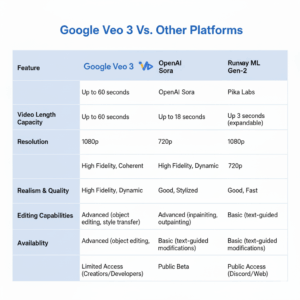
| Feature | Google Veo 3 | OpenAI Sora | Runway Gen-3 | Pika Labs |
| Realism | Film-quality lighting and physics | Cinematic but experimental | Stylized realism | Cartoonish to realistic |
| Audio | Built-in native audio | Planned feature | External sync | None |
| Motion Physics | Physics-aware | Moderate realism | Moderate realism | Basic |
| Duration | Up to several seconds (expandable) | 60 seconds | 15 seconds | 10 seconds |
| Ease of Use | Text and visual prompts | Text-only | Text or video input | Text-only |
| Availability | Invite-only | Developer beta | Public | Public |
Use Cases That Matter
Veo 3 isn’t just an AI curiosity—it’s a tool that could reshape entire industries. Let’s explore its key applications.
Film Pre-Visualization: Directors can test scenes before shooting. Instead of costly location scouting or CGI pre-renders, Veo 3 can visualize storyboards in minutes.
Advertising and Product Videos: Marketers can create short, cinematic product showcases without renting studios or hiring videographers.
Imagine typing:
“A smartwatch floating in a dark room with pulsing neon rings around it, reflecting off its glass surface.”
And instantly getting a 10-second ad clip ready for TikTok or Instagram.
Education and Training: Educational institutions can produce realistic simulations—like lab experiments or historical reenactments—without physical materials.
Gaming and Animation: Game studios can prototype environments and cutscenes using Veo 3 before moving to full 3D modeling.
Social Media Content: For influencers or brands, it’s an instant content engine—short, realistic clips that drive engagement.
Creative Workflow Example
Let’s say you’re a social media manager for a tech brand launching a new laptop. Here’s how Veo 3 could fit your workflow:
| Step | Task | Description |
| 1 | Ideation | Write a 2-sentence prompt describing the product concept. |
| 2 | Generation | Use Veo 3 to generate 3 video options (different angles or lighting). |
| 3 | Review | Choose the most visually appealing version. |
| 4 | Edit | Add logo overlay and brand tagline in your video editor. |
| 5 | Post | Upload to social channels and test engagement metrics. |
Result: You created a cinematic ad in a single day—something that used to take a week.
Strengths and Limitations
| Category | Strength | Limitation |
| Realism | Unmatched lighting and motion accuracy | Sometimes uncanny character faces |
| Audio | Auto-synced ambient sounds | Limited control over soundtrack |
| Speed | Fast generation in “Veo Fast” mode | High-quality mode may take longer |
| Accessibility | User-friendly prompt system | Invite-only at the moment |
| Cost | Cheaper than full film production | Likely subscription-based soon |
Prompting Tips for Best Results
Getting good results from Veo 3 depends heavily on how you write your prompts. Here are some tested guidelines:
- Be specific, not vague.
Instead of “a person walking,” write “a young woman walking along a foggy mountain trail at dawn.” - Include camera instructions.
Example: “Close-up shot,” “aerial drone view,” “slow-motion pan.” - Describe lighting and atmosphere.
“Golden hour sunlight” or “blue neon reflections” change the mood entirely. - Mention sound cues.
Add “ambient city sounds” or “soft piano playing in the background.” - Limit complexity per prompt.
Veo 3 handles scenes better when they focus on one or two main actions.
Future of AI Video — Where Veo 3 Leads Us
Veo 3 is part of a broader trend where AI and creativity are merging into one. The next stage will likely include:
- Longer video durations (up to minutes instead of seconds)
- Interactive editing (adjusting camera angles after generation)
- Voice-driven prompting (describe the scene aloud)
- Multimodal integration (combine text, images, and sounds for generation)
The implications are massive.
Filmmakers could use it for concept trailers.
Businesses could personalize ads for different audiences at scale.
Educators could build immersive lessons without large budgets.
But it also raises questions—about authenticity, copyright, and human creativity. The more lifelike these videos become, the harder it will be to distinguish between AI-generated and real footage.
Opportunities for Content Creators and Businesses
For Marketers
You can rapidly test multiple ad variations, saving money on production while increasing creative output.
For Small Businesses
It levels the playing field—you can produce premium-quality visuals without hiring an agency.
For Social Media Managers
Veo 3 allows instant content creation for trends. You can make videos that match trending sounds or aesthetics without external editing.
For Filmmakers
Storyboard or pitch scenes visually before committing resources to filming.
The Human Element Still Matters
Even though Veo 3 handles visuals beautifully, human creativity remains essential. The best results come from storytelling, not just description. You still need to convey emotion, intent, and message.
Think of Veo 3 as a creative amplifier—a powerful assistant that executes your ideas faster, but it still depends on your direction.
Conclusion: A New Era of Video Creation
Veo 3 isn’t just another AI generator—it’s a milestone in how we create and consume video. With its realistic motion, cinematic quality, and built-in sound, it sets a new standard for what’s possible in digital storytelling.
While it’s currently invite-only, its potential is too vast to remain limited for long. Soon, creators everywhere—from filmmakers to marketers—will have access to this level of generative power.
And when that happens, the question won’t be “Can I make a professional video?”
It’ll be “How creative can I be with the time I just saved?”
Runway Gen-2 / Gen-3 Alpha: The Future of AI-Powered Video Creation
Have you ever imagined typing a few words — and watching them turn into a cinematic video? That’s not science fiction anymore. Thanks to Runway’s Gen-2 and Gen-3 Alpha, that dream is becoming an everyday creative reality.
Whether you’re a filmmaker, marketer, or just someone who loves telling stories, Runway has opened the door to a new era where imagination becomes motion. You don’t need a studio, camera, or big budget. Just an idea — and Runway turns it into moving art.
What makes this so exciting is how accessible it’s become. AI video tools like Runway let anyone create cinematic storytelling, brand commercials, or even social media campaigns in minutes — something that used to take teams of editors, animators, and thousands of dollars.
And with Gen-3 Alpha, Runway is stepping into something bigger — a model that feels more like directing a dream than editing a video.
What Is Runway Gen-2 and Gen-3 Alpha?
At its core, Runway is an AI-powered text-to-video and image-to-video generator. You can feed it a prompt — something as simple as “a cinematic shot of a whale gliding through clouds at sunset” — and it creates a realistic, moving video clip that feels straight out of a movie.
Gen-2 was Runway’s major leap forward. It allowed users to go beyond static images and bring their visuals to life. You could upload an image or write a text prompt, and the model would turn it into a short video clip with impressive realism.
Then came Gen-3 Alpha, the next evolution — a more refined, dynamic, and powerful model capable of understanding emotion, camera movement, lighting, and cinematic tone on a deeper level.
Here’s a quick comparison to understand how far Runway has come:
| Feature | Runway Gen-2 | Runway Gen-3 Alpha |
| Input Type | Text → Video, Image → Video | Text → Video, Image → Video, Video-to-Video refinement |
| Output Length | Up to 4 seconds | Up to 10 seconds (extendable) |
| Realism | Stylized, creative | Photorealistic, cinematic |
| Control Options | Basic camera & motion presets | Advanced motion control, frame consistency |
| Best For | Concept videos, artistic edits | Storytelling, brand ads, high-end visuals |
| Availability | Public | Limited access / Alpha testers |
With each generation, Runway isn’t just getting smarter — it’s becoming a true creative companion.
How Runway Revolutionizes Creative Storytelling
Storytelling used to rely heavily on equipment — cameras, lights, actors, editors. Now, it relies on creativity and prompts. That’s the revolution.
Runway empowers creators to express stories visually without needing production teams or filming equipment. Whether you’re writing a fantasy novel, producing music videos, or crafting an ad campaign, the tool lets you visualize your imagination instantly.
Imagine this:
- You’re writing a short film script. Type your scene descriptions — “a lonely astronaut floating above Mars” — and Runway gives you a clip to visualize it.
- You’re designing a music video. Upload reference images or storyboards, and let the AI generate matching cinematic sequences.
- You’re a brand designer wanting to test how your ad idea might look — boom, instant video mockup.
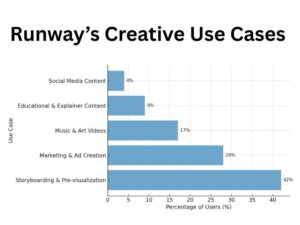
Marketing Power and Use Cases
Now, let’s talk business. Because Runway isn’t just for art — it’s reshaping marketing strategy.
Marketers are constantly chasing attention. The faster they can create captivating visuals, the higher the engagement. Runway lets brands produce cinematic-quality ads without traditional filming costs.
Example Scenarios:
- A real estate company can generate drone-like cinematic shots of future developments before construction even starts.
- A fashion brand can design dreamlike runway clips without booking models or studios.
- A travel agency can showcase scenic destinations using text prompts like “sunrise over Santorini cliffs, cinematic lighting.”
The results? Faster campaigns, lower costs, and limitless creativity.
Pricing and Plan Comparison
Runway offers a free tier for beginners and paid plans for professionals. The pricing structure remains accessible — especially considering what you can create.
Here’s an updated breakdown:
| Plan | Monthly Price | Video Generation Credits | Features | Ideal For |
| Free Tier | $0 | Limited credits (short clips only) | Basic Gen-2 tools, watermark | Beginners, Students |
| Standard Pro | $12/mo | Moderate credit limit | Full Gen-2 access, limited Gen-3 | Casual creators |
| Pro Plus | $35/mo | High credit limit | Full Gen-3 Alpha access, longer clips, commercial rights | Professionals, Agencies |
(Note: Prices may vary based on credit usage and updates.)
Limitations and Tips for Best Use
No AI tool is perfect — and Runway, despite its brilliance, has its quirks.
Limitations
- Clip Length: Currently capped around 10 seconds (though you can chain clips).
- Consistency: Multi-shot story coherence can vary; transitions sometimes need editing.
- Rendering Time: Complex prompts may take minutes or more, depending on server load.
- Alpha Access: Gen-3 Alpha is limited to select users and may require approval.
Tips for Better Results
- Be Descriptive: The more vivid your prompt, the better the video. Use tone words like “cinematic lighting,” “soft focus,” or “slow camera pan.”
- Start Simple: Test short scenes before building full stories.
- Combine Tools: Use Runway for visuals and pair it with editing software like CapCut or Premiere for polish.
- Leverage Image Prompts: Upload reference photos to guide composition and style.
- Adjust Motion Controls: In Gen-3 Alpha, tweak motion intensity and camera angle for more realistic results.
The Future: From Alpha to Cinema-Ready AI
Runway’s Gen-3 Alpha isn’t just an upgrade — it’s a glimpse into the next creative frontier. Soon, we’ll likely see full-length AI-generated films, personalized ads created from just one sentence, and storytelling powered entirely by imagination.
The company’s vision goes beyond tools. Runway wants to build an ecosystem — where creators, brands, and educators collaborate within a visual AI environment. That means shared models, creative templates, and possibly, AI “co-directors.”
If Gen-2 was about making motion easy, Gen-3 is about making emotion real.
Conclusion: Why Runway Belongs in Every Creator’s Toolkit
In an era defined by visuals, Runway is giving power back to storytellers. It bridges the gap between idea and execution, allowing anyone to direct their own mini-movies with nothing more than imagination and text.
From filmmakers visualizing scripts to brands producing cinematic ads, the possibilities are endless. The free tier invites experimentation, while the Pro plans unlock full creative control.
What makes Runway Gen-3 Alpha special isn’t just its technology — it’s the way it understands storytelling. It feels intuitive, emotional, and deeply human — even though it’s powered by code.
As AI video generation becomes the new norm, Runway stands as one of the most creative and accessible platforms in the market — proving that cinematic storytelling no longer needs a camera, just creativity.